
Permanently Remove files | Bypass Recycle Bin | Forever delete files
A strong protection for accidental deletion of files is the Windows Recycle Bin. However, you can disable it if you realize that you want to permanently delete a folder. Press Shift+Del instead of pressing the Del button, then press Shift+Enter to verify.
You can also disable the Recycle Bin permanently if you prefer. First, right-click the Recycle Bin and then select Properties. Select on the drive from which you want to deactivate the Recycle Bin, then select “Do not move files to the Recycle Bin. Delete files as soon as they are removed.” Click OK or Activate to save the changes.
Step 1 : Right click on Recycle Bin :
Must Read : How to Check Wi-fi Password

Step 2: Click on Properties:
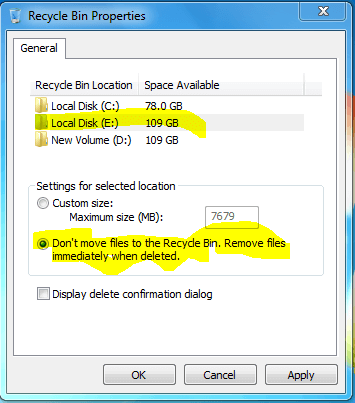
Step 3: Select Radio button Don’t move files to recycle bin.
OR
You can directly delete the files : Press Shift+Del button to permanently delete file or folder.
